Fund Flow Clarification
Fund Flow Clarification
This section provides a clear overview of Capay’s account structure, supported payment methods, and corresponding fund flows.
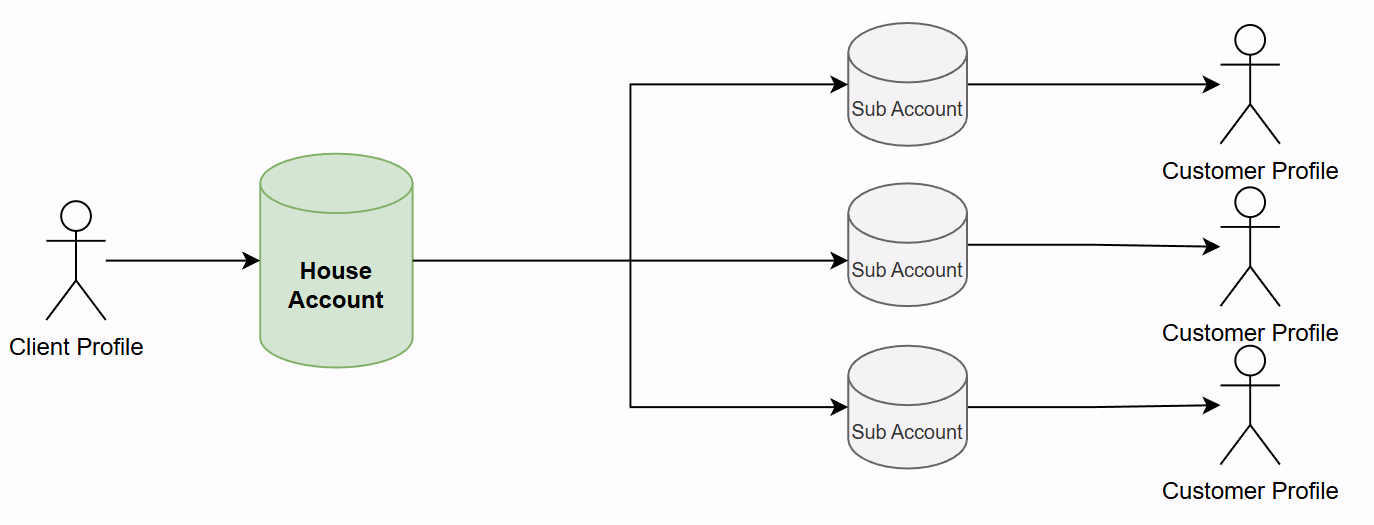
1. Account Structure in Capay
- Each client on Capay is assigned a House Account, which maintains the primary balance.
- Clients may create one or more Sub-Accounts, each of which can also hold a balance. Please note each sub-account actually is connected with a separate underlying customer profile.
- Clients are required to create Underlying Customers via API.
Each underlying customer includes profile information such as name, address, and other required KYC details.
2. Payouts to Australia
Capay supports two payout methods:
2.1 Normal Payment
- Source of funds: House Account
- Beneficiary view (Sender name): House Account holder name
- **Flow:
**Funds are deducted directly from the House Account and paid to the beneficiary.
2.2 POBO Payment (Pay On Behalf Of)
- Source of funds: Sub-Account
- Beneficiary view (Sender name): Sub-Account holder name
- Fund flow logic:
- Sub-Accounts are designed to maintain a zero balance by default.
- To ensure sufficient funds for payout, the system automatically:
- Allocates the required amount from the House Account to the Sub-Account.
- Deducts the same amount from the Sub-Account to complete the payout.
As a result, two transaction records are generated in the Capay system:
- Internal transfer from House Account to Sub-Account
- Payout deduction from Sub-Account
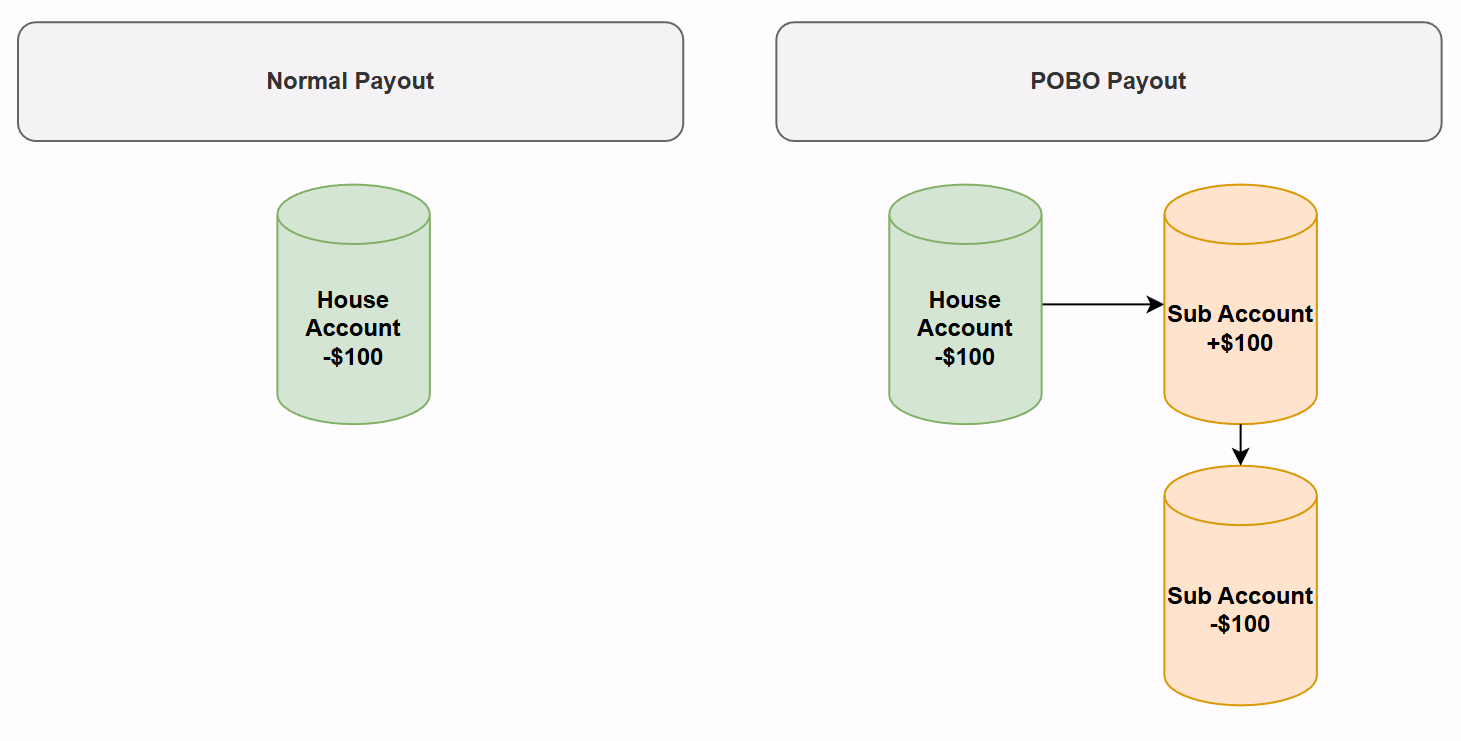
The above diagram illustrates this flow using a $100 example.
3. Pay-ins in Australia
Both House Accounts and Sub-Accounts can be assigned AUD virtual accounts, which are used for fund collection.
Capay supports two pay-in methods:
3.1 Normal Pay-in
- Payee: Virtual account linked to the House Account
- **Fund flow:
**Funds are credited directly into the House Account.
3.2 COBO Pay-in (Collect On Behalf Of)
- Payee: Virtual account linked to a Sub-Account
- Fund flow logic:
- Funds are first credited into the Sub-Account.
- The system automatically transfers the funds from the Sub-Account to the House Account.
Accordingly, two transaction records are created:
- Credit into Sub-Account
- Internal transfer from Sub-Account to House Account
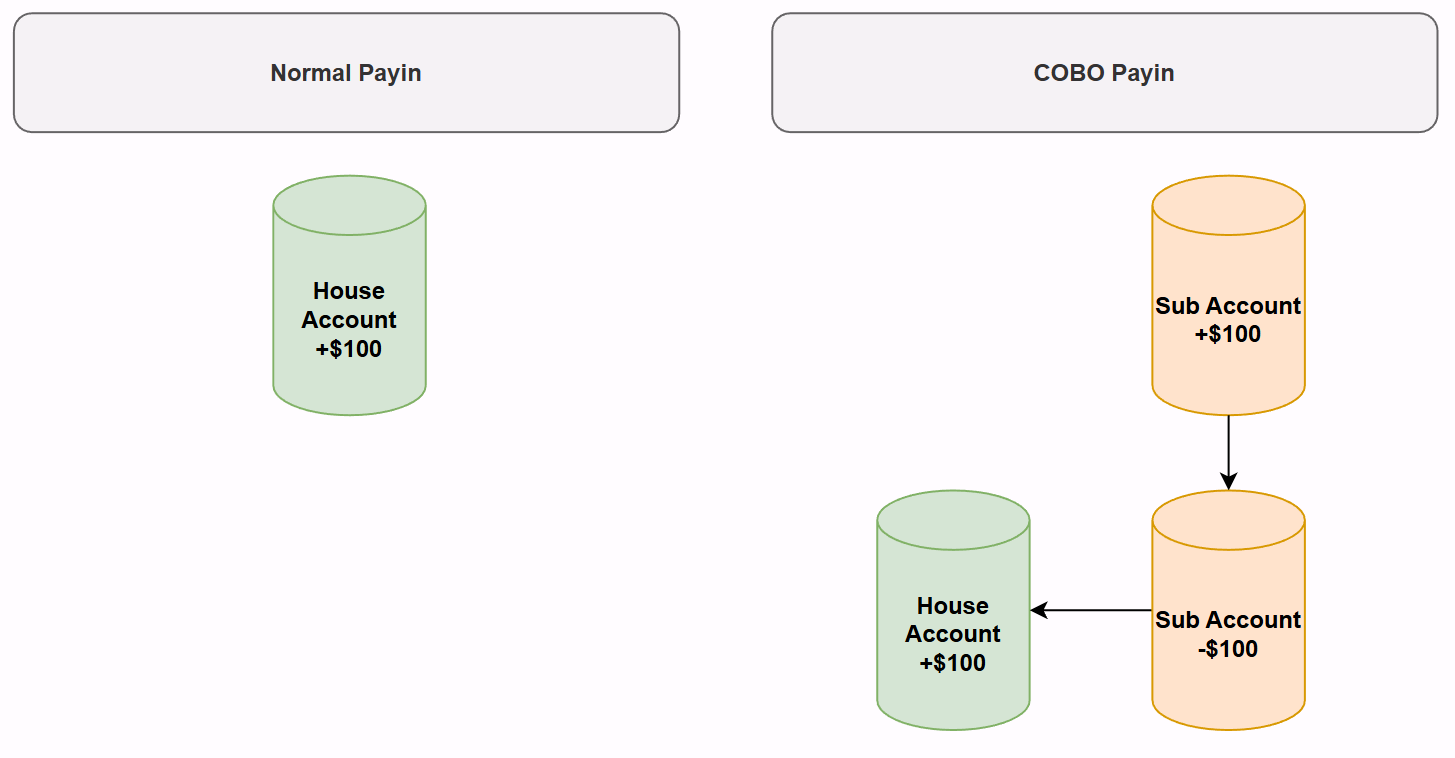
The above diagram illustrates this flow using a $100 example.
4. Fund Allocation Between Accounts
From an account structure perspective, both House Accounts and Sub-Accounts are technically capable of holding balances. However, in practice, Sub-Accounts are designed to maintain a near-zero balance at most times, as fund allocation between accounts is handled automatically and executed in near real time.
A common question is whether manual fund allocation between House Accounts and Sub-Accounts is supported.
- At present, Capay does not provide an API to manually trigger fund allocation between these accounts. All fund movements are system-driven and automated, in accordance with the payment and collection flows described above.
- Support for manual fund allocation via API is currently under development and will be introduced in a future release.